db.execSQL("delete from TABLENAME where rowid not in (select min(rowid) from TABLENAME group by COLOUMNNAME);");
Saturday, January 26, 2013
Removing duplicate rows from sqlite table
db.execSQL("delete from TABLENAME where rowid not in (select min(rowid) from TABLENAME group by COLOUMNNAME);");

Count number of rows in a sqlite table
long numRows = DatabaseUtils.queryNumEntries(db,"Table_name");
Get image from sdcard and put in imageview
File imageFile2 =new File(Environment.getExternalStorageDirectory(),"/images/"+imagef2);
if(imageFile2!=null)
{
Bitmap bitmap2 = BitmapFactory.decodeFile(imageFile2.getAbsolutePath());
imageview.setImageBitmap(bitmap2);
}
Delete image from sdcard:
File file =new File(Environment.getExternalStorageDirectory(),yourfilename);
file.delete();
Populate AlertDialog with CheckBoxes
boolean[] isChecked = null;
final List<CharSequence> selectedItems = new ArrayList<CharSequence>();
final CharSequence[] others = {"value1","value2", "value3", "value4" };
AlertDialog.Builder buildnew = new AlertDialog.Builder(this);
buildnew .setTitle("Select ");
buildnew .setMultiChoiceItems(others,isChecked, new DialogInterface.OnMultiChoiceClickListener() {
public void onClick(DialogInterface dialog, int which, boolean isChecked) {
if(isChecked)
{ selectedItems.add(others[which]);
}
else
{
selectedItems.remove(others[which]);
}
StringBuilder stringBuilder = new StringBuilder();
for(CharSequence item : selectedItems)
stringBuilder.append(item + ",");
edittext.setText(stringBuilder.toString());
}
});
buildnew.setPositiveButton("Done", new DialogInterface.OnClickListener() {
public void onClick(DialogInterface dialog, int which)
{
dialog.dismiss();
}
});
buildnew .create();
buildnew .show();
Sunday, January 20, 2013
Create Excel file and store in sdcard
Create an excel file in android :
Download jxl.jar from
try the following code in your class file
an excel file will be created in sdcard
String Fnamexls="testfile" + ".xls";
File sdCard = Environment.getExternalStorageDirectory();
File directory = new File (sdCard.getAbsolutePath() + "/newfolder");
directory.mkdirs();
File file = new File(directory, Fnamexls);
WorkbookSettings wbSettings = new WorkbookSettings();
wbSettings.setLocale(new Locale("en", "EN"));
WritableWorkbook workbook;
try {
int a = 1;
workbook = Workbook.createWorkbook(file,
wbSettings);
//workbook.createSheet("Report",
0);
WritableSheet sheet =
workbook.createSheet("First Sheet", 0);
Label label = new Label(0, 2, "SECOND");
Label label1 = new Label(0,1,"first");
Label label0 = new Label(0,0,"HEADING");
Label label3 = new Label(1,0,"Heading2");
Label label4 = new Label(1,1,String.valueOf(a));
try {
sheet.addCell(label);
sheet.addCell(label1);
sheet.addCell(label0);
sheet.addCell(label4);
sheet.addCell(label3);
} catch (RowsExceededException e) {
// TODO Auto-generated catch block
e.printStackTrace();
} catch (WriteException e) {
// TODO Auto-generated catch block
e.printStackTrace();
}
workbook.write();
try {
workbook.close();
} catch (WriteException e) {
// TODO Auto-generated catch block
e.printStackTrace();
}
//createExcel(excelSheet);
} catch (IOException e) {
// TODO Auto-generated catch block
e.printStackTrace();
}
export sqlite to excel
http://sourceforge.net/projects/sqlitebrowser/
- download sqlitebrowser
Open Sqlitedatabrowser
File open database- select ur db file
After it is opened
Go to file – export – table as csv file

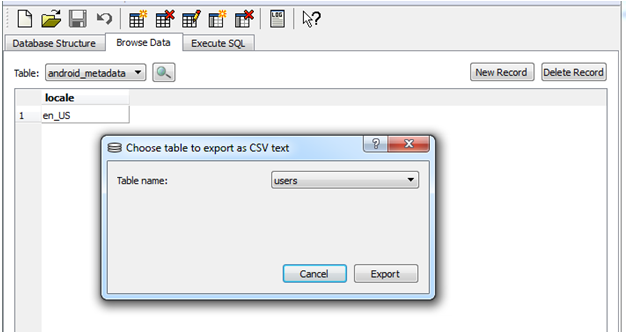


Export table as csv file
Select table name –click Export
Open excel
Goto file - Open
Select -All files in the right side and choose ur file
Then select Delimited
Next –
Select Comma also as delimiter

Next
Finish
Now you can see the db fields in excel sheet
Now go to file – save as – excel
Thus your db is converted to excel.
Subscribe to:
Posts (Atom)